Total Visibility Over Your Facilities Data
The FMI Works Power BI Reporting Connector brings live facilities data directly into your organisation's reporting environment - no exports, no custom development required. Contact our team today to discuss pricing.

Why Facilities Data Gets Left Behind
Facilities teams generate valuable operational data every day but getting that data into enterprise dashboards has never been straightforward. Without a direct integration, reporting becomes a manual, inconsistent process that slows decision-making and limits visibility.

Facilities data often sits in isolation, unable to connect with finance, HR, or operations reporting without significant manual effort.
Exporting data by hand is time-consuming and error-prone, introducing inconsistencies that undermine confidence in your reports.
Without a direct connection, extracting or transforming data typically requires IT involvement, creating bottlenecks and delays - meaning the data is often outdated by the time it’s uploaded.
When different teams pull data at different times, reports rarely match, making it harder to align on a single version of the truth.
A Smarter Way to Integrate Facilities Reporting
The FMI Works Reporting Connector provides a secure, pre-configured connection between your FMI Works environment and Power BI. Your team gets access to structured, curated data views they can use to build dashboards and analyse trends without any custom development or complex setup.
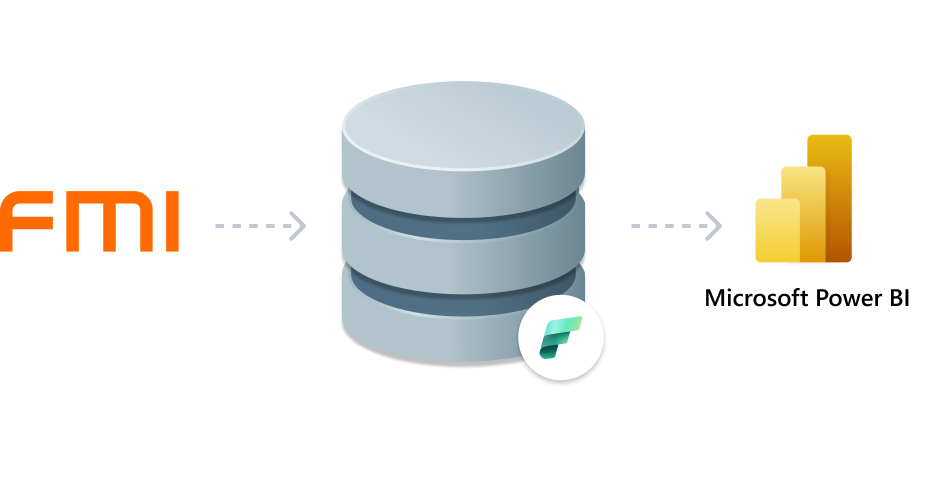
Pull near real-time facilities data directly from FMI Works into Power BI, keeping your dashboards accurate and up to date.
The Connector is pre-configured and maintained by FMI, so your team can get started without writing a single line of code.
Structured, read-only data views simplify the underlying data, making it straightforward for Power BI to consume and analyse.
Facility teams and analysts can build and manage their own reports without relying on IT for data extraction or transformation. Prefer a hands-off approach? FMI can build and configure the Reporting Connector on your behalf.
FMI manages the connection and underlying data views over time, so your reporting environment stays reliable as your platform evolves.
Connected. Consistent. Confident.
Bring your facilities reporting into the same ecosystem as the rest of your business. FMI’s Reporting Connector ensures one secure connection, structured data, and dashboards your team can actually trust. Contact our team to explore pricing options today!
Connected Reporting with FMI Works
Tired of chasing down accurate facilities data? The FMI Works Power BI Reporting Connector gives you near real-time access to your facilities data directly within your existing reporting ecosystem - with no manual exports, no custom development, and minimal reliance on your IT team.
With the Reporting Connector, you can:


Build custom dashboards using FMI Works data
Sync facilities data across the enterprise reporting ecosystem
Connect facilities performance to broader business KPIs
Deliver accurate, automated reports to key stakeholders
Reduce manual reporting effort and free up time for higher-value analysis
Analyse facilities data alongside other key business data
How the Reporting Connector Works
Our Reporting Connector is designed to fit into your existing reporting environment with minimal friction.
FMI handles the technical setup and ongoing maintenance, so your team can focus on building dashboards that drive better facilities decisions.

FMI provisions a Microsoft Fabric Workspace with secure, read-only data views sourced directly from your FMI Works environment, covering work orders and assets data

Your team connects Power BI to those curated views and begins building dashboards and reports using live, structured operational data, with no manual exports and minimal IT involvement.

FMI maintains the connection and underlying views over time, ensuring your data remains accurate, consistent, and aligned with your ecosystem as it grows.

Data Security and Compliance
FMI's Reporting Connector is built with security and data integrity at its core. Access is managed through your own Power BI workspace, keeping your organisation in full control of who can see and interact with your facilities data.
All data views exposed through the Reporting Connector are read-only, ensuring your FMI Works data cannot be modified through Power BI.
Your organisation manages access and permissions within your own Power BI environment, giving you full control over data visibility and user access.
The Connector is provisioned through Microsoft Fabric Workspace, leveraging Microsoft's enterprise-grade security and compliance infrastructure.
FMI ensures the underlying data views remain accurate and up to date, reducing the risk of errors or inconsistent data appearing in your reports.
The Connector uses curated views rather than direct database connections, protecting the integrity of your underlying FMI Works data.
Ready to get started with FMI Works?
Speak to our dedicated team of experts and find out how we can help.
Our Customers
Discover the organisations and facility teams using our solutions everyday.






























Real Stories. Real Results.
See how facilities teams use the FMI platform to solve challenges and drive results.














Ready to level up your organisation?
Schedule a free demo of FMI Works to discover how we can help you centralise and streamline your facilities management processes.


Frequently Asked Questions
The FMI Works Power BI Reporting Connector is a pre-configured integration that allows organisations to connect their FMI Works facilities data directly to Microsoft Power BI for reporting and analysis, without manual exports or custom development.
The Connector provides access to curated, read-only views of your work order and assets data from your FMI Works environment, structured specifically for use in Power BI dashboards and reports.
No. The Connector is pre-configured and delivered by FMI through a Microsoft Fabric Workspace. Business users and analysts can connect directly from Power BI without requiring IT involvement or custom development (unless specified during the team discovery process).
The Connector provides access to near real-time data from your FMI Works environment, so your dashboards and reports reflect current operational information without the delays associated with manual data exports. The Reporting Connector will display updated data every five minutes.
Yes. The Connector integrates with your existing Power BI environment, allowing your team to incorporate FMI Works data into new or existing reports and dashboards alongside other business data.
FMI Works is responsible for maintaining the Connector and the curated data views over time, ensuring they remain reliable, and aligned with your team’s needs as it is updated.
Yes. Once your FMI Works data is available in Power BI, you can combine it with data from other sources such as finance, HR, or operations to create unified business dashboards.
The Power BI Connector is available to FMI Works customers as an optional add-on for enhanced reporting capabilities. Contact the FMI team to explore suitability, discuss pricing, and how to get started.
Get in Touch
Whether you're exploring a specific feature or ready to discuss pricing, our team is here to help.
Fill in your details below and we will get back to you soon.
Latest News and Articles
Explore latest industry insights, news and updates from the FMI Blog.


Join the FMI Community
Subscribe to our monthly newsletter to get practical insights, industry updates, product news, and expert resources delivered to your inbox.